Best Productivity Apps for Managing Daily Tasks
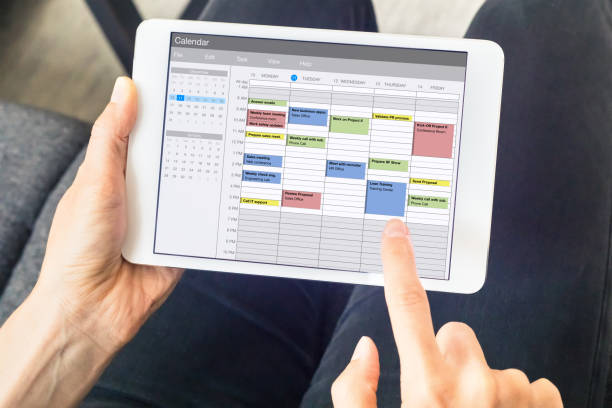
Modern life is busy, and many people struggle to balance work, study, family responsibilities, and personal goals. Productivity apps help users organize their routines and complete tasks without feeling overwhelmed every day.
These applications provide reminders, calendars, task lists, and note-taking features that improve planning. Users can prioritize important activities and avoid missing deadlines or appointments during busy schedules and work periods.
Many productivity apps also improve concentration by reducing distractions and creating structured workflows. People can manage projects more effectively while keeping important information organized in one easy and accessible digital place.
Students, business professionals, freelancers, and even families use productivity apps for better time management. These tools increase efficiency and help users achieve goals faster with less stress and confusion daily.
Task Management Apps for Better Organization
Task management apps are among the most popular productivity tools available today. These applications allow users to create to-do lists, set priorities, and track completed tasks in a simple and organized manner.
One widely used app is Todoist, which helps users create personal and professional task lists with reminders and deadlines. Its clean interface makes daily planning easy for beginners and experienced users alike.
Another excellent option is Microsoft To Do, which integrates smoothly with Microsoft services. Users can manage work assignments, grocery lists, and personal goals using customizable task categories and notifications.
TickTick is also popular because it combines task management with calendars, habit tracking, and focus timers. This combination helps users improve productivity while maintaining healthy and organized routines daily.
Note Taking Apps That Improve Productivity
Taking notes is essential for remembering important information, ideas, and project details. Productivity note-taking apps help users save information quickly while keeping everything searchable and properly categorized for future use.
Evernote is one of the oldest and most trusted note-taking applications. Users can create text notes, save images, store documents, and organize everything into notebooks for easier access and management.
Another highly recommended app is Notion, which combines notes, task management, and databases in one platform. Many teams and individuals use it for planning projects and organizing workflows effectively.
Google Keep provides a lightweight and simple solution for quick notes and reminders. Users can color-code notes, add voice recordings, and synchronize information across multiple devices instantly.
These note-taking apps improve productivity by reducing the chances of forgetting important tasks or ideas. They also help users access information quickly without wasting time searching through paper documents or scattered files.
Calendar and Scheduling Apps for Time Management
Scheduling applications help users manage appointments, meetings, and important deadlines efficiently. These apps improve time management by creating structured daily plans and sending reminders before important events begin.
Google Calendar is one of the most widely used scheduling tools because it syncs across devices and integrates with email accounts. Users can create events, invite participants, and schedule reminders easily.
Professionals often prefer Calendly because it simplifies appointment booking. Instead of exchanging multiple messages, users can share available time slots for quick and convenient meeting scheduling.
Fantastical is another advanced calendar application known for its clean design and smart scheduling features. It helps users organize events, reminders, and tasks within a single user-friendly interface.
Using scheduling apps prevents missed appointments and improves productivity by helping people allocate time wisely. Better planning also reduces stress and creates a balanced daily routine for both personal and professional activities.
Collaboration Apps for Team Productivity
Many workplaces depend on collaboration apps to improve communication and teamwork. These tools help employees share files, discuss projects, and manage tasks together without confusion or unnecessary delays in operations.
Slack is widely used for workplace communication because it organizes conversations into channels. Teams can share updates, files, and project discussions quickly while reducing excessive email communication daily.
Another powerful collaboration platform is Trello, which uses boards and cards to track project progress visually. Teams can assign tasks, monitor deadlines, and update workflows efficiently and transparently.
Asana provides advanced project management features for businesses and organizations. Users can create projects, assign responsibilities, track deadlines, and monitor overall team productivity from one centralized platform.
These collaboration tools improve workflow efficiency and communication among remote and office teams. Businesses save time while ensuring everyone remains informed about project progress, deadlines, and responsibilities throughout daily operations.
Focus and Time Tracking Apps for Better Efficiency
Staying focused is difficult because of social media, notifications, and constant distractions. Focus and time-tracking apps help users concentrate on important work while monitoring how time is spent during the day.
Forest encourages productivity through a creative system where users grow virtual trees while staying away from distractions. This method motivates people to maintain concentration during study or work sessions.
Another useful application is RescueTime, which automatically tracks digital activities and provides reports about productivity habits. Users can identify distractions and improve their daily time management strategies effectively.
Pomodone uses the Pomodoro technique to divide work into focused intervals with short breaks. This method improves concentration, reduces burnout, and increases overall efficiency throughout long working hours.
Focus applications are especially valuable for students, remote workers, and freelancers who need strong concentration. By minimizing distractions and tracking productivity patterns, users can complete more tasks within shorter periods successfully.
Choosing the Right Productivity App for Your Needs
Selecting the right productivity app depends on personal goals, work style, and daily requirements. Some people prefer simple applications, while others need advanced project management and collaboration features for professional tasks.
Users should consider factors like ease of use, device compatibility, pricing, and available features before choosing an app. Testing free versions can help determine whether the application matches individual productivity habits and preferences.
Combining multiple productivity apps can also improve efficiency. For example, users may use one app for notes, another for scheduling, and a separate application for task management and team communication purposes.
The best productivity apps simplify daily routines and help users stay organized consistently. With proper use, these tools can improve focus, save time, reduce stress, and support better personal and professional productivity every day.

About Premium Author
This post has been authored and published by one of our premium contributors, who are experts in their fields. They bring high-quality, well-researched content that adds significant value to our platform.
You Might Also Like
Popular Categories
Stay Connected
Recent Posts